3D Render Prompts: 7 Copy-Paste Prompts for ChatGPT, Gemini
7 3D render prompts: studio product renders, interiors, architectural exteriors, characters, abstract shapes and logo renders; works in ChatGPT, Gemini and Entrobase Canvas.
Tested: EntroGen Flash, November 2026
Prompt
Fill in the fields below and the prompt updates instantly. Copy it and use it in any AI tool.
Create a 3D render of a product that looks shot in a studio.
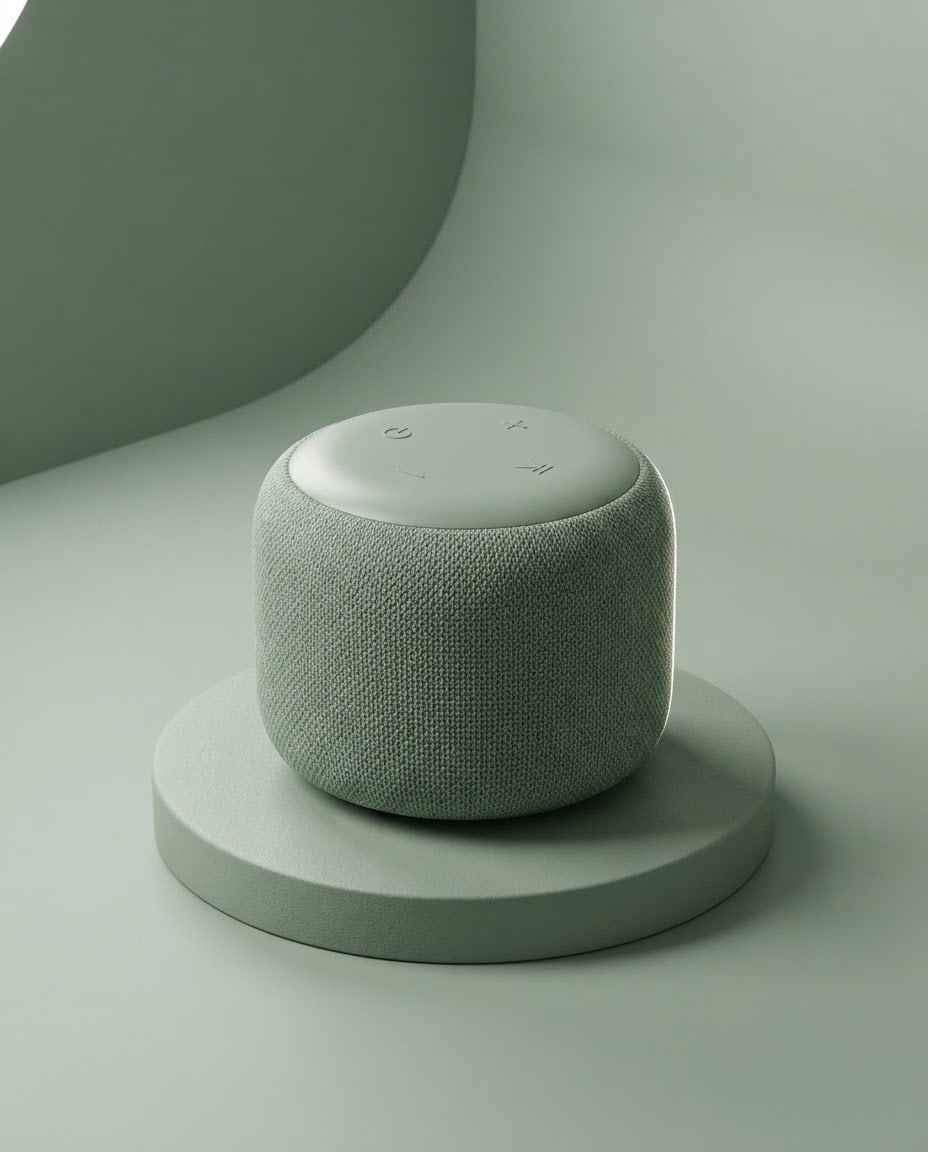
Producta small rounded wireless speaker covered in fabric; unbranded, no text or logo on it.
Settingthe product on a round sage green podium; behind it a curved seamless backdrop in the same tone.
Materialmatte knit fabric and soft-touch plastic; realistic reflections and soft roughness on the surfaces.
Lighta broad soft box from the top left, a thin rim light from the right, a soft contact shadow under the podium.
Cameraslightly from above, three-quarter angle, 85 mm feel, the product sharp front to back.
Stylephotorealistic 3D product render, a clean studio look.
Palettethe background color, two product tones and white highlights.
Compositionproduct centered, podium in the lower third, generous space above and beside the product.
Aspect ratio 4:5.
Image made with this prompt
6 more ready-to-use prompts
Different takes on the same topic. Copy any of them as is and replace the parts in square brackets.
1.3D render prompt from a product photo in Gemini
When to use: When you want to turn your product photo into a studio render.
Turn the product in my uploaded photo into a studio 3D render.
- Keep
- the product's shape, proportions and colors.
- Setting
- a round [e.g. peach] podium with a seamless backdrop in the same tone.
- Light
- a soft box from the top left with a contact shadow below.
- Camera
- three-quarter angle.
- Ratio
- 4:5
2.Interior 3D render prompt
When to use: When you want a render of a room or shop.
Create a photorealistic 3D render of an interior.
- Space
- [e.g. a small living room in wood and linen with a large window].
- Light
- afternoon sun through the window, soft shadows.
- Camera
- eye level, 24 mm wide angle.
- Style
- architectural visualization render.
- Ratio
- 16:9
3.Architectural exterior render prompt
When to use: When you want to show how a house or building will look from outside.
Create an exterior 3D render of a building.
- Building
- [e.g. a two-story white stucco house with wooden shutters] and a garden.
- Light
- golden hour, warm sunset.
- Camera
- from the garden gate, eye level.
- Style
- photorealistic architectural render.
- Ratio
- 16:9
4.3D character render prompt for ChatGPT
When to use: When you want a character rendered like a toy or animated figure.
Create a 3D render of an original character.
- Character
- [e.g. a frog in big glasses and a yellow raincoat], fictional.
- Style
- soft 3D animation render with matte textures.
- Background
- a flat [e.g. light blue] studio backdrop.
- Light
- soft from the front, rim light from behind.
- Text
- no text in the image.
- Ratio
- 1:1
5.Abstract 3D render prompt
When to use: When you want an abstract 3D image for slides, a website or social media.
Create an abstract 3D render.
- Shapes
- [e.g. a sphere, ring and cube balanced on each other].
- Material
- [e.g. frosted glass and polished chrome].
- Background
- flat [e.g. pale lilac].
- Light
- soft studio light with shadows under the shapes.
- Text
- no text in the image.
- Ratio
- 4:5
6.3D logo render prompt
When to use: When you want to present a flat logo as a 3D render.
Show my uploaded logo as a 3D render.
- Keep
- the logo's shape and colors.
- Material
- [e.g. matte ceramic] with a slight bevel on the edges.
- Setting
- in front of a flat [e.g. light gray] backdrop, turned slightly.
- Light
- soft from the top left with a shadow below.
- Ratio
- 1:1
What this prompt does
If you want to show a product at studio quality without a photo shoot, the main prompt renders it on a colored podium under soft box light as a photorealistic 3D render. The 6 variants below cover interiors, architectural exteriors, characters, abstract shapes, logos and renders from your own product photo in ChatGPT and Gemini.
Where to use it
- E-commerce product image
- Product launch post
- Slide and web hero
- Product concept pitch
Fields you can fill in
The fields you can change in the form above and their default values.
- ProductFree text
- a small rounded wireless speaker covered in fabric
- MaterialOne of 4 options
- matte knit fabric and soft-touch plastic
- Background colorOne of 4 options
- sage green
- RatioOne of 3 options
- 4:5
Step by step
- 1
Describe the product by its shape
Put its shape, size and finish in the Product field (rounded, small, fabric-covered). Leave out the brand name; the render comes out unbranded and you add the logo later.
- 2
Pair the material with the background
Fabric and ceramic look best on soft pastel backgrounds; brushed aluminum and glass look best on light stone gray.
- 3
Check the light and shadow
There should be a soft contact shadow under the podium; without it the product looks like it floats. Strengthen the shadow line if needed.
Tips and variations
- Use 4:5 for Instagram and 16:9 for a web hero; at 16:9 move the product to the right third and keep the backdrop plain on the left for a headline.
- If you have a photo of your product, use the Gemini variant; the model keeps the shape and turns the light and background into a studio render.
- For colorways change only the Background color; with the same light and camera lines the images read as a series.
Frequently asked questions
How do I write a 3D render prompt for ChatGPT?
Put the product, material, setting, light and camera angle on separate lines. 'Photorealistic 3D product render' and 'curved seamless backdrop' lock in the studio look.
Does a Gemini 3D render prompt work with my product photo?
Yes. Upload the photo and write 'turn this product into a studio 3D render with the same shape'; Gemini uses the uploaded image as a reference.
Is a 3D render the same as a 3D model?
No. This prompt makes an image (JPG or PNG) that looks rendered; it does not make a rotatable 3D model file.
Why is there no text or logo on the render?
Image models often garble small text on products. Rendering unbranded and adding the logo later in a design tool gives a cleaner result.





