3D Model Prompts: 7 Prompts for ChatGPT and Gemini (2026)
7 3D model prompts: game prop presentations, four-angle turntables, modeling references, printable figures, characters and a 3D look from your own photo; works in ChatGPT, Gemini and Entrobase Canvas.
Tested: EntroGen Flash, November 2026
Prompt
Fill in the fields below and the prompt updates instantly. Copy it and use it in any AI tool.
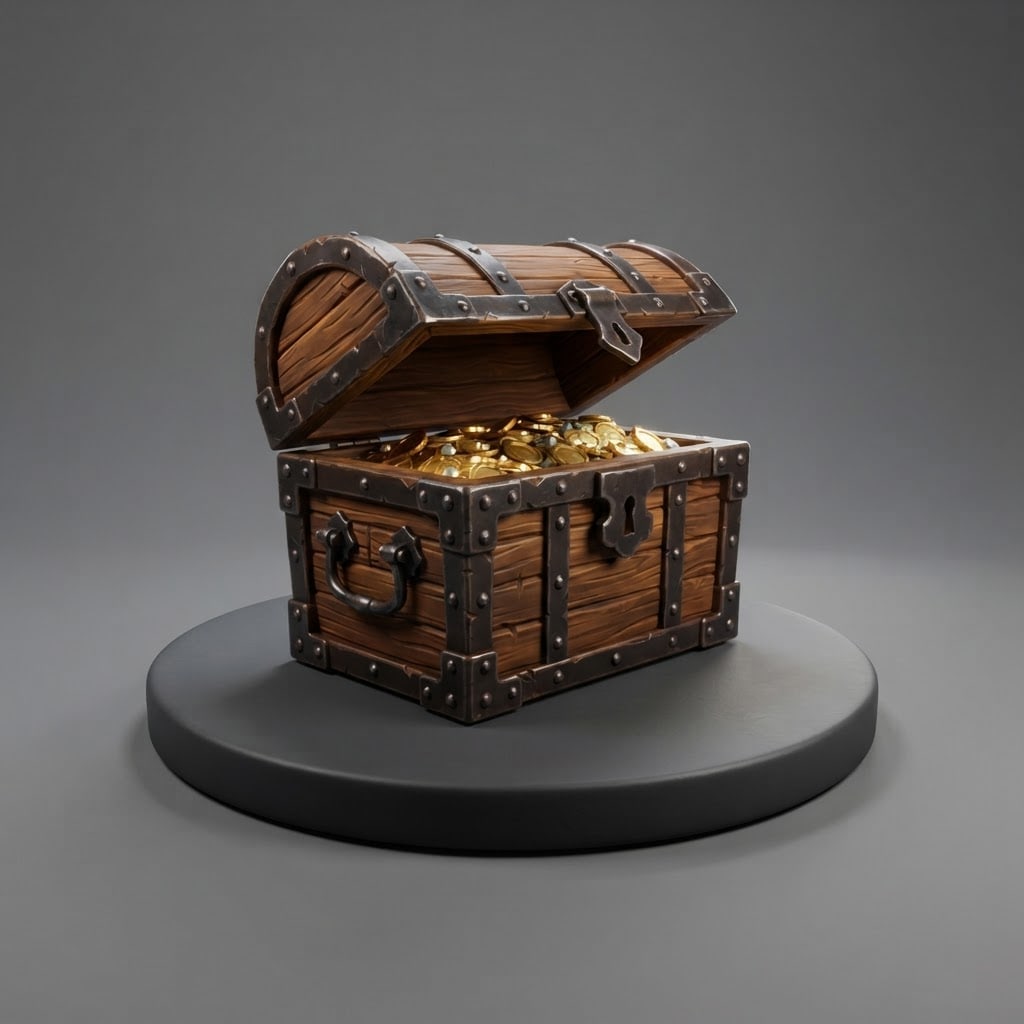
Create a presentation image of a 3D model, as in a modeling portfolio.
Objecta half-open wooden treasure chest with iron corners and gold coins inside; original and unbranded.
Stylea stylized game model with hand-painted textures; clean surfaces and edges, the model complete and tidy.
Settingthe object on a round, dark gray turntable; behind it a plain mid-gray studio backdrop.
Lightthree-point studio light; key from the front left, fill from the right, a thin rim from behind; a soft shadow on the turntable.
Cameraslightly from above, three-quarter angle, 50 mm feel, the object sharp front to back.
Palettethe object's own colors, the gray backdrop and white highlights.
Compositionsquare frame, object centered with balanced space around it, turntable near the bottom edge.
Textno text, labels or measurements in the image.
Aspect ratio 1:1.
Image made with this prompt
6 more ready-to-use prompts
Different takes on the same topic. Copy any of them as is and replace the parts in square brackets.
1.3D model turntable prompt
When to use: When you want to see an object from four sides in one image.
Draw a turntable presentation of a 3D model.
- Object
- [e.g. a stylized lantern], original.
- Layout
- the same object four times side by side; front, side, back, three-quarter.
- Style
- [e.g. a game model with hand-painted textures].
- Background
- flat mid-gray.
- Text
- no text in the image.
- Ratio
- 16:9
2.3D model prompt from a photo in Gemini
When to use: When you want an object you own presented like a 3D model.
Draw the object in my uploaded photo as a 3D model presentation image.
- Keep
- shape, proportions and colors.
- Style
- a clean, stylized 3D model render.
- Setting
- a gray turntable and a flat gray backdrop.
- Light
- three-point studio light.
- Ratio
- 1:1
3.Modeling reference prompt: front and side
When to use: When you need a reference to start modeling in a program like Blender.
Create a modeling reference image of an object.
- Object
- [e.g. a retro table radio], unbranded.
- Layout
- a straight front view on the left and a straight side view on the right, both the same size.
- Camera
- flat orthographic.
- Style
- gray clay render.
- Background
- flat white.
- Text
- no text or measurements in the image.
- Ratio
- 16:9
4.3D printable figure prompt
When to use: When you want an idea for a figure you can 3D print.
Create a render of a figure designed for 3D printing.
- Figure
- [e.g. a small owl reading a book], original.
Rules
- Thick, sturdy parts, no thin floating tips.
- A wide, round base.
- Style
- single-color light gray resin look.
- Background
- flat dark gray.
- Ratio
- 1:1
5.3D character model prompt for ChatGPT
When to use: When you want to present a character like a game model.
Draw a 3D model presentation of an original character.
- Character
- [e.g. a cute little monster with small horns], fictional.
- Pose
- A-pose, arms slightly out, full body.
- Style
- stylized game model with hand-painted textures.
- Setting
- a gray turntable.
- Text
- no text in the image.
- Ratio
- 3:4
6.Low poly 3D model prompt
When to use: When you want a lightweight-looking model for a mobile game.
Create a presentation image of a low poly 3D model.
- Object
- [e.g. a small wooden rowboat].
- Style
- flat-colored triangular faces, sharp edges.
- Setting
- a flat [e.g. light blue] backdrop with a soft shadow below.
- Camera
- three-quarter, slightly from above.
- Text
- no text in the image.
- Ratio
- 1:1
What this prompt does
Most people searching '3D model prompt' want to present an object as if it were a 3D model or use it as a modeling reference; the main prompt draws the object on a turntable under three-point studio light as a portfolio-style 3D model render. The 6 variants below cover four-angle turntables, modeling references, printable figures, characters and a 3D model look from your own photo in ChatGPT and Gemini.
Where to use it
- Game prop idea
- 3D modeling reference
- Portfolio presentation
- Sketch before 3D printing
Fields you can fill in
The fields you can change in the form above and their default values.
- ObjectFree text
- a half-open wooden treasure chest with iron corners and gold coins inside
- StyleOne of 4 options
- a stylized game model with hand-painted textures
- RatioOne of 3 options
- 1:1
Step by step
- 1
Describe the object by its parts
Write the main body, material and one detail in the Object field (wooden body, iron corners, gold inside). Naming parts separately sharpens the model's edges.
- 2
Pick the style for its use
Stylized suits games, realistic PBR suits products and film, gray clay suits judging the form, and low poly suits mobile games.
- 3
Check it as a modeling reference
If you will model from it, make sure the silhouette and parts read clearly; use the turntable variant below to get four angles if needed.
Tips and variations
- Gray clay shows the form without color distraction; it is the best choice for approving a shape before modeling.
- For four angles of the same object in one image use the turntable variant at 16:9.
- When designing a figure for 3D printing avoid thin floating parts; write 'thick, sturdy parts and a wide base' in the prompt.
Frequently asked questions
Can ChatGPT make a 3D model?
The image models in ChatGPT and Gemini make an image that looks like a 3D model, not a 3D model file (GLB, OBJ, STL). That image works as a modeling reference or a presentation shot.
How do I write a 3D model prompt for Gemini?
Put the object, style, presentation setting, light and camera angle on separate lines. 'Turntable, plain gray studio backdrop' makes the image read like a portfolio render.
Can I get a 3D model look from a photo?
You can get the look. Upload a photo of the object to Gemini and write 'show this object with the same shape as a stylized 3D model render'; the result is still an image.
Are these 3D model prompts free to use?
The prompts on this page can be copied into the tool of your choice; that tool's own terms and limits apply.





