8 3D Avatar Prompts (ChatGPT): Examples and Guide (2026)
8 3D avatar prompts that need no photo: profile avatars, team avatar sets, streamer, animal, robot and business profile avatars; works in ChatGPT, Gemini and Entrobase Canvas.
Tested: EntroGen Flash, November 2026
Prompt
Fill in the fields below and the prompt updates instantly. Copy it and use it in any AI tool.
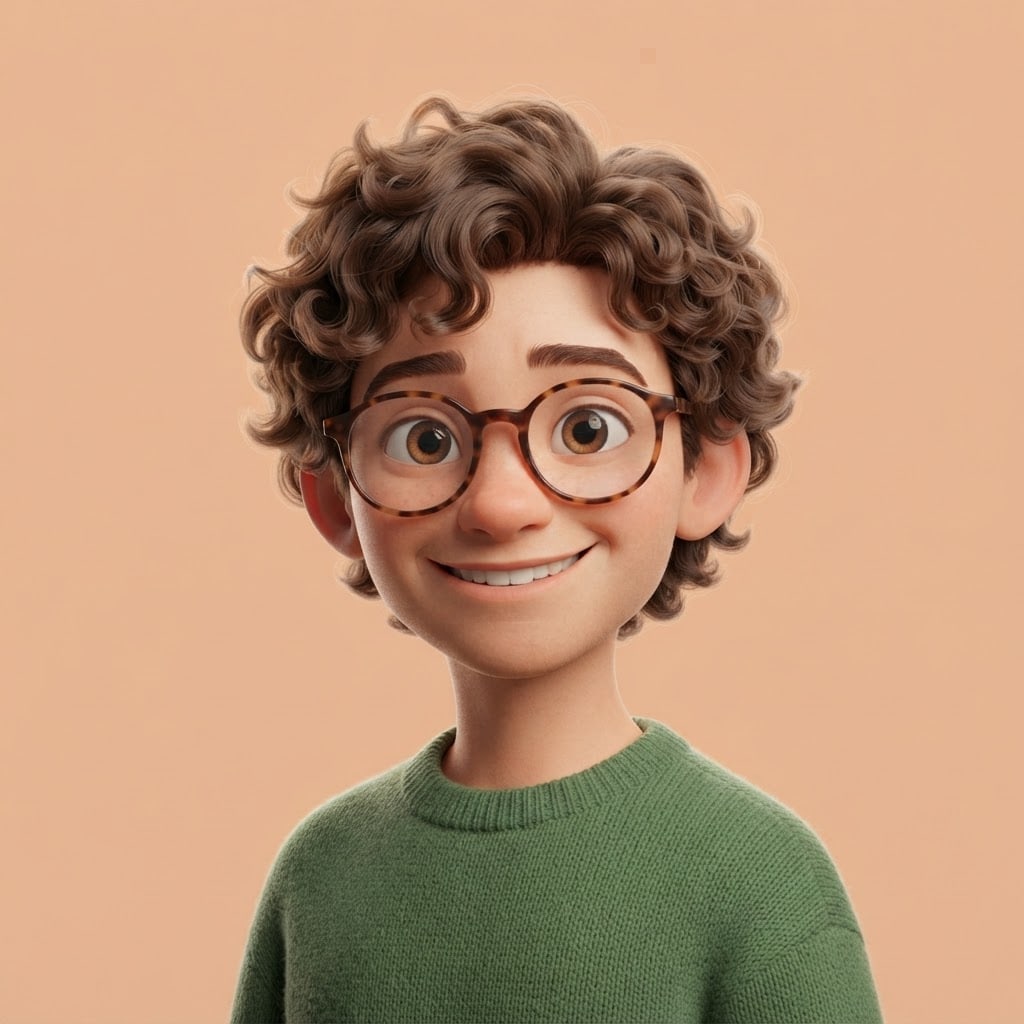
Create an original 3D avatar to use as a profile picture.
Persona young designer with curly brown hair, round glasses and a green sweater; fictional, not resembling any real person.
Expressionsmiling warmly.
Style3D animated film style with big expressive eyes.
Framinghead and shoulders, face toward the camera, slight three-quarter turn.
Backgroundplain, single color #f4c9a8.
Lightsoft studio light from the front, a thin rim light from behind.
Cameraeye level, 85 mm portrait feel, face sharp.
Palettethe person's clothing colors with soft tones that match the background.
Compositiona square frame with the flat background color running unbroken to all four corners; face dead center, space above the head and beside the shoulders.
Textno text in the image.
Aspect ratio 1:1.
Image made with this prompt
7 more ready-to-use prompts
Different takes on the same topic. Copy any of them as is and replace the parts in square brackets.
1.3D avatar prompt for a team page: set of 4
When to use: When an about or team page needs several fictional avatars in one style.
Create a 3D avatar set of 4 fictional people for a team page.
- People
- [e.g. a woman with short hair and glasses, a bearded man, a young woman with braids, an older man in a beret].
- Layout
- 2 x 2 grid, each avatar framed head and shoulders.
- Style
- 3D animated film style.
Rules
- Same light and the same [e.g. light blue] background in all four.
- No text in the image.
- Ratio
- 1:1
2.ChatGPT 3D avatar prompt for streamers and gamers
When to use: When your Twitch, YouTube or Discord profile needs a gamer-style avatar.
Create an original 3D avatar for a game streamer.
- Person
- [e.g. a young gamer with blue hair and LED headphones]; fictional.
- Expression
- confident smile.
- Style
- 3D animated film style with a neon rim light.
- Background
- plain dark purple.
- Framing
- head and shoulders.
- Text
- no text in the image.
- Ratio
- 1:1
3.3D cartoon avatar prompt with an animal character
When to use: When you would rather show a cute animal than a face on your profile.
Create a 3D avatar with an animal character for a profile picture.
- Character
- [e.g. a fox with round glasses and a turtleneck sweater].
- Expression
- warm smile.
- Style
- soft furry 3D animated character.
- Background
- plain [e.g. mustard yellow].
- Framing
- head and shoulders, face centered.
- Text
- no text in the image.
- Ratio
- 1:1
4.3D avatar AI prompt for a business profile (no photo)
When to use: When LinkedIn or internal tools need a professional but warm avatar.
Create an original, professional-looking 3D avatar for a business profile.
- Person
- [e.g. an entrepreneur with short black hair and a navy blazer]; fictional.
- Expression
- confident, slight smile.
- Style
- clean 3D render, close to realistic but stylized.
- Background
- plain light gray.
- Framing
- head and shoulders.
- Text
- no text in the image.
- Ratio
- 1:1
5.Gemini 3D avatar prompt: 4 expressions of your avatar
When to use: When you want the avatar you made in different expressions for chat, stickers or app states.
Create a 4-expression set of the 3D avatar I uploaded.
- Character
- the avatar in the image; hair, clothes and colors kept exactly.
- Expressions
- smiling, surprised, thinking, winking.
- Layout
- 2 x 2 grid, same framing and same background.
- Text
- no text in the image.
- Ratio
- 1:1
6.Robot and sci-fi 3D avatar prompt
When to use: When a tech profile or a bot needs a non-human avatar.
Create a cute robot 3D avatar for a profile picture.
- Robot
- [e.g. a white robot with a round head, a screen face and an antenna]; two smiling eyes on the screen.
- Style
- glossy white plastic with teal light accents.
- Background
- plain dark navy.
- Framing
- head and shoulders.
- Text
- no text in the image.
- Ratio
- 1:1
7.Clay 3D avatar prompt
When to use: When you want a handmade, warm, toy-like profile image.
Create an original 3D avatar that looks like clay.
- Person
- [e.g. a freckled student with red hair and a yellow scarf]; fictional.
- Expression
- laughing cheerfully.
- Style
- matte clay with a visible handmade texture and soft forms.
- Background
- plain [e.g. light mint green].
- Framing
- head and shoulders.
- Text
- no text in the image.
- Ratio
- 1:1
What this prompt does
If you want a 3D avatar without uploading a photo, the main prompt turns a fictional person you describe into a head-and-shoulders profile picture on a flat color, ready for a circle crop. The 7 variants give ChatGPT and Gemini prompts for team avatar sets, streamer, animal, robot and business avatars, none of which need a photo.
Where to use it
- Social media profile picture
- Team and about page
- Streamer and gamer avatar
- Forum and community profile
- Default in-app avatar
Fields you can fill in
The fields you can change in the form above and their default values.
- PersonFree text
- a young designer with curly brown hair, round glasses and a green sweater
- ExpressionOne of 4 options
- smiling warmly
- StyleOne of 4 options
- 3D animated film style with big expressive eyes
- Background colorColor
- #f4c9a8
- RatioOne of 3 options
- 1:1
Step by step
- 1
Describe the person with three clear traits
Put hair, an accessory and a clothing color in the Person field (for example curly brown hair, round glasses, a green sweater). These three traits still read in a small profile circle.
- 2
Pick the expression, style and background
The Expression field offers smiling, confident, laughing and thoughtful. Choose a background color that stands apart from the platform; light peach reads in both light and dark themes.
- 3
Generate in Canvas and test a circle crop
Generate in Canvas with Use Prompt and crop the image with a circle mask. If hair or ears spill out, switch to 4:5, generate again and crop square.
- 4
Make the same avatar in other expressions
Upload the avatar you like to Gemini and use the expression set variant; the reference keeps the facial features.
Tips and variations
- For a team page, give everyone the same background color and style line so different people look like one family.
- On dark-themed platforms use a saturated background; a pale pastel can glare and overpower the face.
- Do not write a real person's name or a celebrity's look; original traits are safer and more consistent.
- Avatars are shown small, so skip patterns or scenes in the background; a flat color brings the face forward.
Frequently asked questions
Does the ChatGPT 3D avatar prompt work without a photo?
Yes, describe hair, accessories, clothing and expression and ChatGPT creates a fictional 3D avatar with no photo. None of the prompts on this page ask for one.
Can a Gemini 3D avatar prompt give me the same avatar in other expressions?
Upload the avatar you made to Gemini and ask for the same character with different expressions. The reference helps keep the hair and facial features.
How do I write a 3D cartoon avatar prompt?
Put 3D animated film style with big expressive eyes in the style line and set the framing to head and shoulders. A flat background and soft front light strengthen the cartoon look.
What size should a profile avatar be?
Platforms upload profile pictures as squares and show them as circles, so 1:1 is the best ratio. Google's model page says Gemini 3.1 Flash Image generates at 1K resolution by default, which is enough for a profile picture.
Can I use a 3D avatar on a commercial site?
If you described a fictional person, you can use it on a team or user page; if it stands in for real staff, saying it is an illustration is the honest route.





