3D Anime Prompts: 7 Ready-to-Use Prompts for Gemini (2026)
7 3D anime prompts: a 3D anime character in a scene, 3D anime from your own photo, anime figures, wallpapers and game characters; works in Gemini, ChatGPT and Entrobase Canvas.
Tested: EntroGen Flash, November 2026
Prompt
Fill in the fields below and the prompt updates instantly. Copy it and use it in any AI tool.
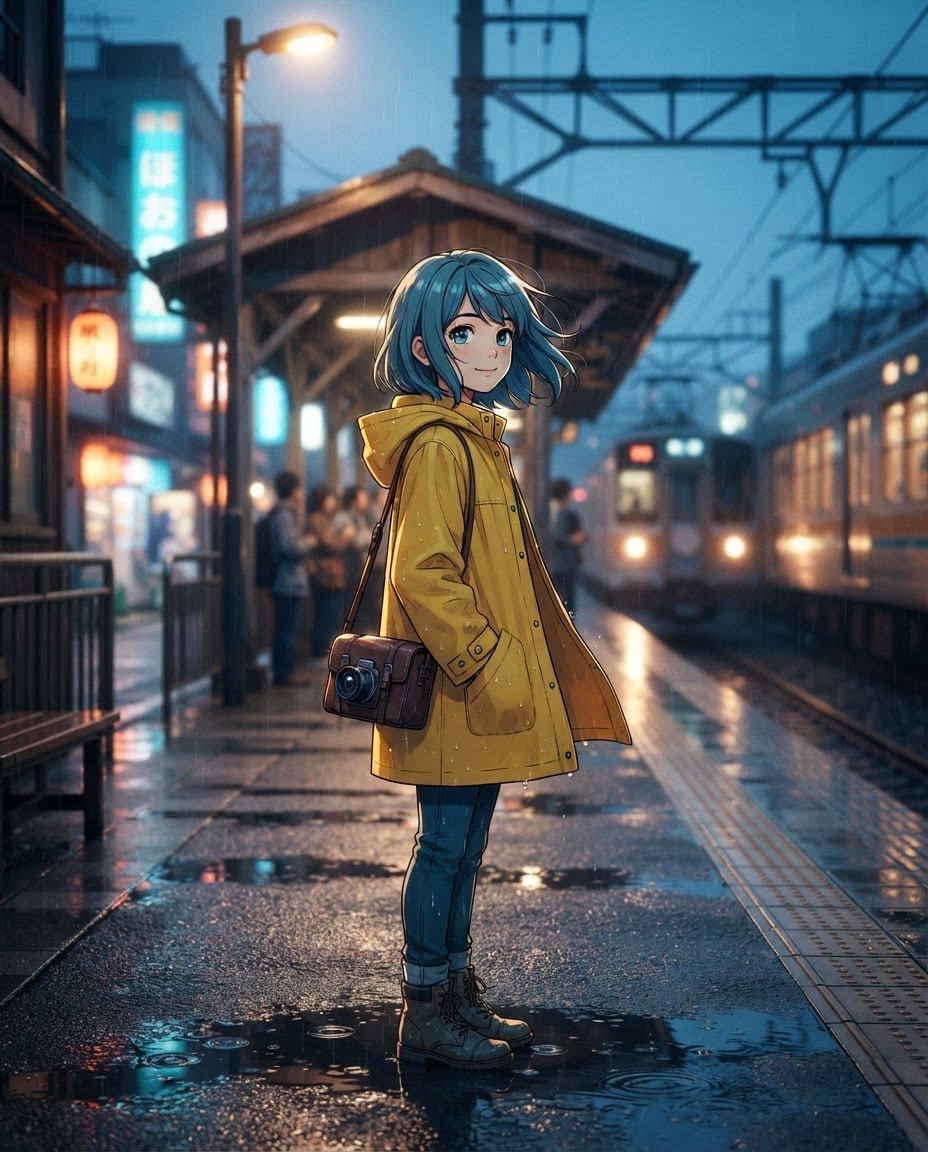
Create an image of an original character standing inside a scene, in 3D anime style.
Charactera girl with short blue hair, a yellow raincoat and a camera on her back; fictional, not resembling any known anime or game character.
Scenea small train station after rain, light reflecting on the wet ground.
Style3D anime render, cel shading, thin dark outlines, big expressive eyes, hair and fabric moving in the wind.
Lighta strong rim light from behind, soft fill from the front; warm and cool light together in the scene.
Cameraslightly low angle, 35 mm feel, knees up, character sharp, background slightly blurred.
Paletteteal, mustard yellow and night blue.
Compositionvertical frame, character a little left of center, the depth of the scene visible on the right.
Textno text in the image, no readable letters on signs.
Aspect ratio 4:5.
Image made with this prompt
6 more ready-to-use prompts
Different takes on the same topic. Copy any of them as is and replace the parts in square brackets.
1.3D anime character from your photo in Gemini
When to use: When you want to see yourself as a 3D anime character.
Turn the person in my uploaded photo into a 3D anime character.
- Keep
- face shape, hair color and style.
- Style
- 3D anime render, cel shading, thin outlines.
- Scene
- [e.g. under lanterns at a night market].
- Framing
- knees up.
- Text
- no text in the image.
- Ratio
- 4:5
2.3D anime figure prompt
When to use: When you want the character to look like a collectible figure on a desk.
Show an original anime character as a collectible figure.
- Character
- [e.g. an orange-haired archer girl in armor], fictional.
- Figure
- about 20 cm on a round clear base, painted PVC texture.
- Setting
- a wooden desk with a blurred shelf behind.
- Light
- soft studio light.
- Text
- no text in the image.
- Ratio
- 4:5
3.3D anime wallpaper prompt for phones
When to use: When you want a vertical anime scene for a lock screen.
Create a 3D anime scene for a phone wallpaper.
- Character
- [e.g. a teen with a long white scarf], back slightly turned, fictional.
- Scene
- a rooftop under a starry sky.
- Style
- 3D anime render, cel shading.
- Composition
- character in the lower third, wide sky above.
- Text
- no text in the image.
- Ratio
- 9:16
4.3D anime game character prompt for ChatGPT
When to use: When you need a 3D anime-style hero design for a game.
Design a 3D anime-style hero for an action game.
- Character
- [e.g. a short red-haired fighter with a mechanical arm], fictional.
- Pose
- standing, full body, determined stance.
- Background
- flat [e.g. light gray] studio backdrop.
- Style
- 3D anime render, cel shading.
- Text
- no text in the image.
- Ratio
- 3:4
5.3D chibi anime style prompt
When to use: When you want a small, cute 3D anime character.
Create a 3D chibi anime character.
- Character
- [e.g. a girl in a bear-ear hoodie], fictional.
- Proportions
- head half the body height, big eyes.
- Style
- soft 3D render with a matte toy texture.
- Background
- flat [e.g. pastel purple].
- Text
- no text in the image.
- Ratio
- 1:1
6.Two-character 3D anime scene
When to use: When you want a cover or story image with two characters together.
Create a 3D anime scene with two characters.
- Characters
- [e.g. a boy with glasses] and [e.g. a girl playing with a cat], fictional.
- Scene
- [e.g. an uphill street in a seaside town] at sunset.
- Style
- 3D anime render, cel shading.
- Composition
- characters in the foreground, the street receding behind.
- Text
- no text in the image.
- Ratio
- 16:9
What this prompt does
If you want a 3D anime-looking character inside its own scene, the main prompt draws a cel-shaded character with wind in the hair and fabric, from a low angle in a scene with depth. The 6 variants below cover 3D anime from your own photo in Gemini and ChatGPT, anime figures, wallpapers, game characters and chibi.
Where to use it
- Phone and desktop wallpaper
- Story and web novel cover
- Game character idea
- Social media post
Fields you can fill in
The fields you can change in the form above and their default values.
- CharacterFree text
- a girl with short blue hair, a yellow raincoat and a camera on her back
- SceneOne of 4 options
- a small train station after rain, light reflecting on the wet ground
- PaletteOne of 3 options
- teal, mustard yellow and night blue
- RatioOne of 3 options
- 4:5
Step by step
- 1
Give the character one signature item
Put hair, outfit and one item that identifies the character (a camera, a sword, a book) in the Character field. With the scene, that item tells the character's story.
- 2
Match the scene and palette
The station scene works best with the teal palette and the hill with the sunset palette. The Scene option also sets the light direction.
- 3
Check the vertical ratio
4:5 is for social posts, 9:16 for phone wallpapers. Keep the character left of center; the depth on the right carries the image.
Tips and variations
- For 2D anime write 'flat-colored anime drawing' instead of '3D anime render'; the scene and light lines stay.
- Upload your own character drawing to Gemini and write 'put this character into this scene as a 3D anime render' to keep your design.
- Keep the 'no readable letters on signs' line whenever shop signs or posters appear in the scene.
Frequently asked questions
How do I write a 3D anime prompt for Gemini?
Put the character, scene, style, light and camera on separate lines. 'Cel shading, thin dark outlines' keeps a 3D render looking like anime.
Can ChatGPT turn my photo into 3D anime?
Yes. Upload your photo and write 'keep my face and hair, draw me as a 3D anime render'. Describing line and shading works better than naming a studio.
What is a 3D anime figure prompt?
It shows the character as a collectible figure on a desk with a base and studio light. The figure variant below does this.
What ratio works for a 3D anime wallpaper?
9:16 for phones, 16:9 for desktops. On vertical wallpapers keep the character a little left of center so the face stays clear of the clock.





