New app
Start a New Website or App with Builder
What do you want to build?
Describe it; Entrobase builds the first version and opens it in the Builder. Keep improving it by chatting.
Your app runs on iPhone and Android. Try it instantly on your phone with Expo Go; on Pro and above you can build an installable Android app with your own Expo account. iOS builds and automatic store submission are coming soon.
Enter to send · Shift+Enter for a new line
Need an idea?
Click one to put it in the box, then edit it as you like.
How it works in 3 steps
No code and no design tool to learn. You describe what you want.
Describe it
Write what your business does, who it is for and which sections you want. You can also add your logo or a screenshot of a design you like.
Entrobase builds it
The first version is built and opens in the Builder with a live preview. Tell the chat what to change; the preview refreshes after every request.
Publish
When it is ready, press Publish and your site goes live at yourname.entrobase.site. Try a mobile app on your phone right away by scanning a QR code.
Start from a template
Open a template, look at its live preview and adapt it to your business by chatting in the Builder.

Veterinary Clinic Website
Veterinary Clinic1 page

Fintech SaaS Website
SaaS Product1 page

Preschool Website
Preschool & Daycare1 page

Skincare Shop Website
Skincare & Cosmetics1 page

App Landing Page
Mobile App Launch1 page

Yoga and Pilates Studio Website
Yoga & Pilates Studio1 page
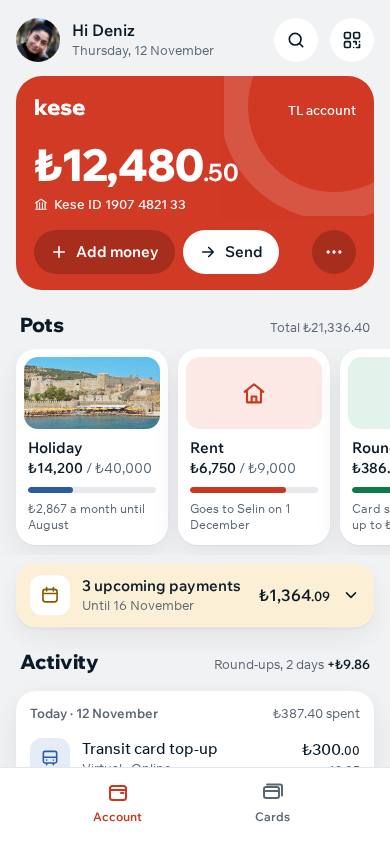
Digital Wallet App
Digital wallet3 screensPro
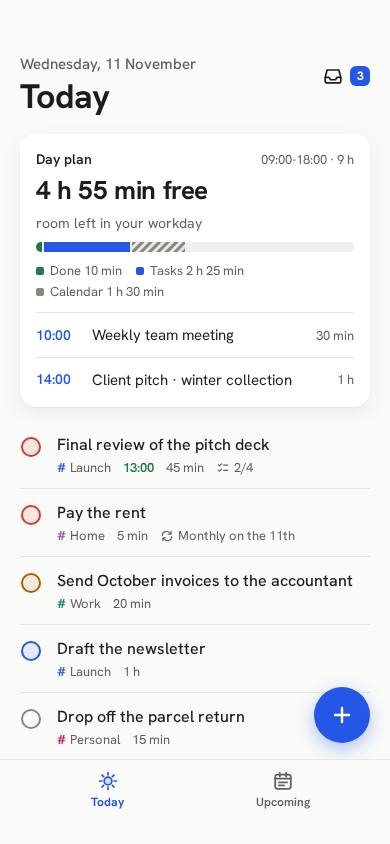
To-Do List App
To-do list3 screensPro
Frequently asked questions
Do I need to know how to code to build a website?
No. You write what you want and Entrobase builds the site. After that you change it by chatting, for example "make the heading bigger" or "add a contact section". You can also click text such as headings and paragraphs in the preview and edit it yourself.
Can I use it for free?
Yes. On the Free plan you can build 1 website and publish it on an entrobase.site subdomain. Connecting your own domain is on paid plans, and mobile apps are on Pro and above.
Can I build a mobile app too?
Yes. Pick Mobile app in the Builder and describe your app; it is built to run on iPhone and Android, and you try it on your phone right away with a QR code. On Pro and above you can also get an installable Android version; iOS builds are coming soon.
How do I publish my site, and can I use my own domain?
Press Publish in the Builder and your site goes live at yourname.entrobase.site. On paid plans you can buy a new domain or connect one you own from the Domains section. Later changes go live when you publish again.
Can I start from a ready-made template?
Yes. The template gallery has ready-made websites and mobile apps by business type. Pick one to copy it, then change it for your business by chatting in the Builder.
Related pages
- AI website builderHow the website builder works, sample prompts and plans
- Free website builderWhat the Free plan includes and how to publish
- AI app builderBuild an iPhone and Android app without code
- Entro Builder featuresEverything the Builder does and how plans compare
- Mobile app featuresWhat the Builder does for iPhone and Android apps
- TemplatesReady-made sites and apps by business type
- Prompt libraryReady-made requests you can copy and use
- Create images with AIMake product photos, logos and posters for your site
- Getting startedA guide to building and publishing your first site
- QR Code Menu Maker for Cafes and RestaurantsMake a QR code menu: pick a cafe or restaurant template, publish it free and point your QR code at it. Change prices any time without reprinting the code.
- Mobile App Ideas You Can Prototype in a Day18 mobile app ideas for small businesses, personal use and learning: who each one helps, how hard it is, and which ones work without a database.
- Restaurant Website Templates: Live Designs and Restaurant AppsRestaurant and cafe website templates with live demos, plus three restaurant app templates. What each one includes, what works today and what it costs.
- What Is Entrobase? Build a Website or Mobile App by Describing ItEntrobase is an AI platform that builds websites and mobile apps from your description. What it does, how it works, pricing, templates, EntroLab and its app.